Module 5 — Agents & Agentic Systems
In this module
- Understand what makes an LLM an agent — and why the difference from a chatbot is architectural, not cosmetic.
- Trace the agentic loop: perceive → plan → act → observe → repeat, and map it to the ReAct pattern.
- Know how tool use / function calling turns the LLM into an orchestrator that dispatches to your own functions.
- Distinguish in-context (short-term) from external (long-term) memory, and understand why the distinction matters at scale.
- Recognise the failure modes — infinite loops, hallucinated tool calls, cost blowup — and know when agents are simply overkill.
Time: ~50 min · Lab: Lab 5 — Agent Loop
Why this matters
Modules 1–4 treated the LLM as a fancy function: one prompt in, one response out. That model breaks down the moment a task requires multiple steps, external state, or decisions that can't be made upfront. Agents solve this by putting the LLM in a loop: it decides what to do, does it, observes the result, and repeats until the task is done. For a senior developer, the mental shift is significant — you stop writing the control flow and start delegating it to the model. Understanding how that delegation works, and where it fails, is the skill this module builds.
Beyond Q&A — what makes something an agent
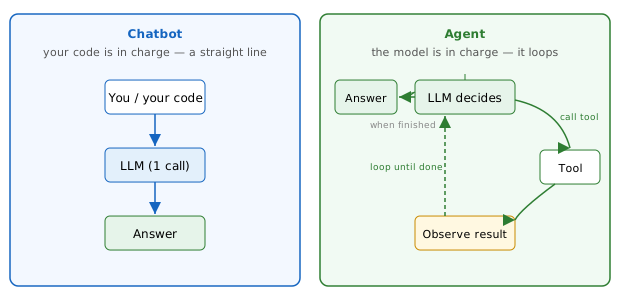
A chatbot is a single LLM call: you send a prompt, you get a response, the interaction ends. An agent is an LLM that can take actions in a loop — deciding, calling tools, observing results — to accomplish a goal across multiple steps.
The structural difference is control flow ownership. In a chatbot, your code drives every step: you decide when to call the model, what to send, and what to do with the output. In an agent, the model drives: it decides which tool to call next, with what arguments, and whether the goal is complete. Your code provides the tools and the agent harness; the model provides the strategy.
The agent harness is worth naming, because it's the part you own. It's the loop that sends the prompt, executes the tool calls the model asks for, feeds the results back, enforces step and budget limits, and decides when to stop. The model supplies the decisions; the harness supplies the plumbing and the safety rails. A framework like LangChain or CrewAI (Module 6) is just a pre-built harness — and you can write a basic one yourself in a few dozen lines, which is exactly what Lab 5 does.
A useful analogy: a chatbot is like a function call — you invoke it, you get a return value, done. An agent is like a background job runner — you hand it a goal, it schedules its own subtasks, and it reports back when it's finished (or when it's stuck).
Who's driving? — the one distinction that defines an agent:
In plain words
A chatbot is a vending machine: press a button, get one item, done. An agent is an intern you hand a goal to — "book me a meeting room for Thursday" — who then makes their own calls, checks the calendar, retries if a room's taken, and comes back when it's sorted. You stopped giving step-by-step orders and started delegating the how.
Tool use / function calling — LLM as orchestrator
Tool use / function calling is the mechanism that gives the LLM hands. You declare a set of callable functions — search_docs(query), run_sql(query), send_email(to, subject, body) — and the model returns not prose but a structured JSON payload specifying which function to call and with what arguments. Your code executes the call, captures the result, and feeds it back as a new message. The model then reasons about the result and decides whether to call another tool or return a final answer.
The orchestrator role is precisely this: the LLM reads the goal and available tools, decides which function runs next, and chains calls together to make progress. Your functions do the actual work; the model provides the dispatch logic.
The developer analogy is direct: your existing codebase is the tool library. You expose a slice of it as typed function signatures with docstrings, and the model becomes the controller that calls them in the right order. You do not rewrite your business logic; you describe it in terms the model can read and invoke.
In plain words — one tool call, start to finish
The model can't do arithmetic reliably, but it can ask for help. Watch one round trip:
- User: "What's a 15% tip on £80?"
- Model (instead of answering) emits a tool call:
calculator("80 * 0.15") - Your code runs it and feeds back the result:
12 - Model: "A 15% tip on £80 is £12."
That hand-off — model asks, your code does, model continues — is the whole idea. The LLM supplies the judgment about which tool and what arguments; your function does the work.
Two practical implications:
- Type safety matters. The model generates the arguments; define tight schemas (JSON Schema or Pydantic) so invalid calls fail fast rather than silently corrupt data.
- Idempotency matters. The model may call the same tool multiple times on retry. Design tool functions the same way you'd design API endpoints for at-least-once delivery.
The agentic loop — perceive, plan, act, observe, repeat
The agentic loop is the repeating cycle that gives an agent its power:
The agent cycle — plan, act, observe, repeat until done or max_steps reached:
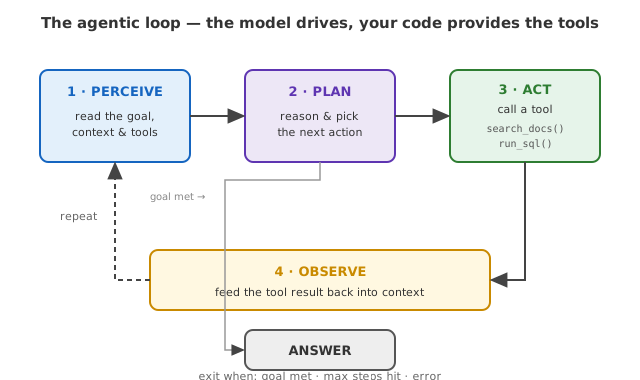
Each iteration: the model reads everything in context (goal + conversation history + previous tool results), reasons about what step comes next, emits a tool call, your harness executes it, and the result is appended to context for the next iteration. The loop exits when the model returns a final answer, when a step count limit is reached, or when an error is unrecoverable.
ReAct (Reasoning + Acting) formalises this as an explicit pattern: the model alternates Thought (a natural-language reasoning trace about what to do next), Action (a tool call), and Observation (the tool result). Making the reasoning visible has two benefits: it improves decision quality on multi-step problems, and it makes debugging tractable — you can read the model's reasoning trace to understand why it made a wrong tool call.
Memory — in-context vs external
Every LLM call is stateless: the model retains nothing between calls. The agent loop compensates by accumulating state in two distinct places.
Short-term (in-context) memory is everything appended to the current context window: the original goal, every tool call, and every tool result so far. It is fast, always available, and requires no infrastructure — but it is bounded by the context window. A long-running agent that makes dozens of tool calls will eventually fill the window, at which point earlier steps must be summarised or dropped.
Long-term (external) memory is state persisted outside the context window — typically in a vector database, a relational store, or a key-value cache. The agent retrieves relevant memories via a tool call (exactly like RAG) and loads only what is needed for the current step. This is how agents handle tasks that span sessions, involve large document corpora, or need to recall decisions made hours or days earlier.
The practical decision: start with in-context memory (simple, no infrastructure); add external memory when your task produces more state than fits in the window or needs to survive across sessions.
Multi-agent systems — orchestrator + specialists
A single agent runs one loop. A multi-agent system runs several agents in coordination, each specialised for a part of the problem.
The standard topology: one orchestrator agent reads the high-level goal, breaks it into subtasks, and dispatches each subtask to a specialist agent — a retrieval agent, a code-writing agent, a validation agent. Each specialist runs its own loop, returns a result, and the orchestrator synthesises the results into a final answer.
Orchestrator + specialists — one boss agent delegating to focused workers:
flowchart TD
  ORCH["Orchestrator agent<br/>(breaks goal into subtasks)"]
  ORCH --> A1["Retrieval agent"]
  ORCH --> A2["Code agent"]
  ORCH --> A3["Validation agent"]
  A1 --> SYN["Orchestrator synthesises → final answer"]
  A2 --> SYN
  A3 --> SYN
The software analogy is a microservices architecture: the orchestrator is the API gateway that routes work to the right service; each specialist is a service with a narrow, well-defined contract. The benefits are the same as microservices — independent scaling, independent failure, clear boundaries — and so are the costs: distributed failure modes, latency from serialised sub-calls, and emergent complexity when agents hand off incorrectly.
When to reach for multi-agent:
- The task is genuinely parallel (e.g. research three topics simultaneously).
- Different subtasks need different models (cheap fast model for retrieval; expensive slow model for synthesis).
- A single agent's context window is too small for the full task.
When to stay with a single agent: when the task is sequential and fits in one context window. Multi-agent adds complexity; use it only when the problem forces you to.
MCP — standard for connecting agents to tools
MCP (Model Context Protocol) is an open standard — introduced by Anthropic in late 2024 and now stewarded under the Linux Foundation with support from OpenAI, Google, and Microsoft — that defines how agents discover and invoke external tools and data sources in a uniform way. It went from one vendor's idea to genuine industry infrastructure fast: by 2026 there are well over 10,000 public MCP servers. When you hear "MCP," think the USB-C of AI tooling — no longer "an Anthropic thing."
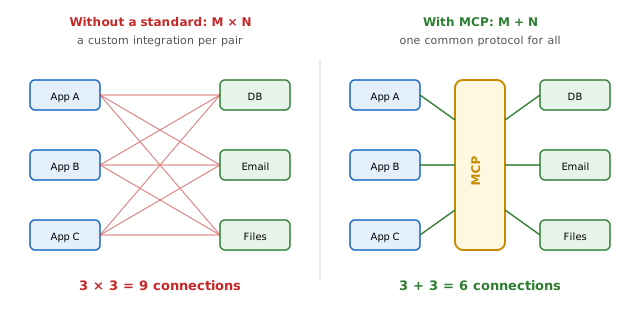
The M×N integration problem. Without a shared standard, every combination of agent framework and external tool requires its own custom glue: LangChain needed its own adapter for GitHub, AutoGen needed another, raw function-calling needed a third. With M agent frameworks and N tool/data sources, you end up writing M×N custom adapters. MCP collapses this to M+N: each agent implements the MCP client side once, and each tool or data source implements the MCP server side once — then any client can talk to any server.
Why a standard pays off — M×N custom adapters collapse to M+N:
In plain words
Before USB, every gadget had its own charger and you needed a drawer full of adapters. USB-C is one plug everything agrees on. MCP is USB-C for AI tools: build the plug once on each side, and any agent works with any tool.
How it works. An MCP server exposes a manifest of available tools (names, schemas, descriptions). The agent — acting as an MCP client — discovers that manifest at startup, then issues typed calls to the server at runtime. The server executes the call and returns a structured result. Concrete MCP server examples already in the wild: a filesystem server (read/write local files), a GitHub server (open issues, create PRs, query repos), a database server (run parameterised SQL), and a search API server (web or internal semantic search). Write an MCP server once and every MCP-aware agent can use it immediately, with no changes to the agents themselves.
The developer analogy: MCP is like USB-C or a common driver interface for agent tools — one standard plug instead of a custom adapter per device. You don't need a different cable for each peripheral; you need one port and one protocol.
Agent Skills — packaged know-how loaded on demand
An Agent Skill is a packaged, reusable capability — typically a folder of instructions plus optional scripts or other resources — that the agent discovers and loads only when a task calls for it. This progressive disclosure keeps the context window lean: instead of stuffing every procedure into every prompt, the agent pulls in exactly the know-how it needs for the current task.
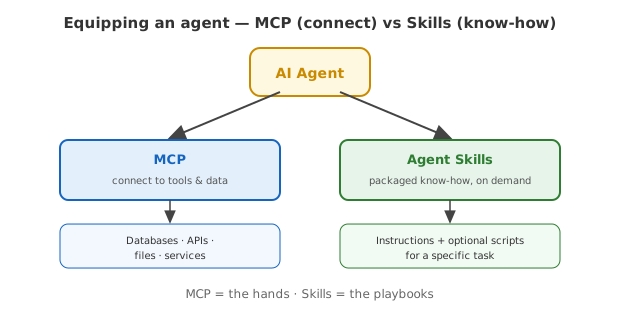
Contrast with MCP. MCP connects the agent to tools and data — it gives the agent hands to reach out and do things (query a database, push a commit, call an API). Skills give the agent playbooks — step-by-step procedures and domain know-how for how to accomplish something ("how to fill out an expense report," "how to triage a support ticket," "how to run a security review"). Think of MCP as the agent's toolkit and Skills as the agent's operations manual.
A concrete example: Claude Code ships with agent skills such as a "code-review" skill and a "design" skill. When you invoke /code-review, Claude loads the skill's instruction set on demand rather than carrying all skills in every conversation. The skill's instructions may themselves direct the agent to call tools — for instance, reading files via the filesystem MCP server — so MCP and Skills naturally compose. A Skill defines what to do; MCP provides the means to do it.
Two ways to equip an agent — MCP (connect) and Skills (know-how):
Failure modes — what goes wrong in production
Agents introduce failure modes that single-call LLMs don't have:
| Failure mode | What happens | Fix |
|---|---|---|
| Infinite loops | Model calls tools in circles — search, fail, rephrase, search again — and never exits | Hard step-count limit (max_iterations); a budget-check tool it can call to self-terminate |
| Hallucinated tool calls | Model invokes a tool that doesn't exist, or passes args that don't match the schema | Strict JSON Schema validation; reject with an error message so the model can correct itself |
| Cost blowup | A long loop with big contexts burns tokens — and dollars — an order of magnitude faster than one call | Per-task token budgets; cache stable tool results; use a cheaper model for inner-loop steps |
| Prompt injection in tool output | A retrieved document contains text that hijacks the agent's next action | Treat tool output as untrusted data; sanitise before insertion; same discipline as SQL parameterisation |
Two umbrella terms you'll hear for handling all of this in production: guardrails — the input/output validation, tool-permission limits, and step/budget caps that box the agent in — and observability / tracing — logging every model and tool call (inputs, outputs, tokens, cost, a trace ID) so you can debug and audit what the agent actually did. Both live in your agent harness, not in the model: the model decides, but your code is what keeps it safe and accountable.
When agents are overkill
Agents have real overhead: latency (multiple round-trips), cost (multiple model calls), and complexity (emergent failure modes). Use a single LLM call when:
- The task is fully defined upfront and can be answered in one response (e.g. "summarise this document").
- There is no conditional branching — you know every step before execution starts.
- The output needs to be deterministic and auditable at every step (a scripted pipeline beats an autonomous one when auditability matters more than flexibility).
The practical heuristic: if you can write the control flow yourself in ten lines of code, do so. Reach for an agent only when the control flow depends on intermediate results you can't predict upfront.
Mental model
Think of an agent as a senior engineer you've put on-call. You hand them a ticket and walk away. They decide which services to query, which runbooks to consult, which scripts to run, and when the job is done. You provide the tools (their laptop, your internal APIs, your runbooks); they provide the judgment about which tool to use and in what order. The agentic loop is that engineer's shift: perceive the situation, form a plan, act, observe the result, adjust the plan, repeat. Your job as the developer is to write clear tool contracts and sensible guardrails — not to prescribe every step.
Hands-on
Open Lab 5 — Agent Loop. You'll build a minimal agent loop from scratch with two tools (a stub web search and a calculator), watch the model decide which tool to call, observe each tool result fed back into the loop, and see how a max_steps guard prevents runaway loops — all on a task that needs a search followed by arithmetic.
Go deeper
-
ReAct Prompting — Prompt Engineering Guide — The definitive written reference for the ReAct pattern; shows the exact thought/action/observation prompt format with worked examples. Read this to understand what the agent is actually writing inside that loop.
-
What is MCP? — IBM Think — Clear, developer-oriented explainer of MCP architecture: what a tool server exposes, how an agent client discovers it, and why the standard matters. Good complement to the IBM AI agents overview.
-
Introducing the Model Context Protocol — Anthropic — Anthropic's original MCP announcement with the rationale for standardisation and a diagram of the client-server architecture. Authoritative source; short read.
-
The Art of Loop Engineering — LangChain Blog — Practitioner-level post on designing agentic loops for production: step limits, error recovery, and the "loopcraft" pattern of stacking loops. Read when you move from toy agent to something you'd ship.
Jargon recap
agent · tool use / function calling · orchestrator · agentic loop · agent harness · ReAct · guardrails · observability / tracing · memory (short / long term) · multi-agent · MCP · Agent Skill · stateless · context window · hallucination
Check yourself
Try to answer before expanding — active recall is what makes it stick.
What is the architectural difference between a chatbot and an agent?
It is about who owns the control flow. In a chatbot your code drives every step (one prompt in, one response out). In an agent the model drives — it decides which tool to call next and when the goal is done — looping until finished.
What is the agent harness, and what does it own versus the model?
The harness is the loop you write: it sends the prompt, executes the tool calls the model requests, feeds results back, and enforces step/budget limits and guardrails. The model supplies the decisions and strategy; the harness supplies the plumbing and the safety rails.
When are agents overkill?
When the task is fully defined upfront, has no conditional branching, or needs deterministic, auditable steps. The heuristic: if you can write the control flow yourself in about ten lines, do that — reach for an agent only when the flow depends on intermediate results you can't predict.
What is the difference between MCP and Agent Skills?
MCP is a standard that connects an agent to tools and data — the agent's hands (query a DB, call an API, read files). Skills are packaged playbooks of know-how loaded on demand — the agent's operations manual (how to do a task). A Skill says what to do; MCP provides the means to do it, so they compose.
Key takeaways
- An agent is an LLM in a loop — it decides, acts via tool calls, observes results, and repeats until done; the model owns the control flow, not your code.
- Tool use / function calling is the mechanism: you expose typed function signatures; the model returns structured dispatch instructions; your harness executes them.
- The ReAct pattern makes the loop debuggable by interleaving explicit reasoning traces with tool calls.
- Short-term memory lives in the context window; long-term memory lives in an external store retrieved via tools — choose based on task duration and data volume.
- Agents earn their complexity only when control flow depends on intermediate results; for predictable multi-step tasks, a scripted pipeline is simpler and cheaper.